

You need to pull every email address or phone number out of a large block of text. You’ve written a validation pattern and want to be sure it matches what it should. The fastest way to write regex is to test as you go.
This guide shows how to test regular expressions with live highlighting in the free Regex Tester, along with some handy patterns. Nothing you type is sent anywhere.
Running a script every time I tweaked a pattern got old fast. Seeing matches as I type makes trial and error so much easier.
What is a regular expression?
A regular expression (regex) is a way to describe a text pattern with symbols. For example, \d{4}-\d{2}-\d{2} means “four digits, a hyphen, two digits, a hyphen, two digits”, which finds dates like 2026-10-08.
Some common building blocks:
\d: one digit\w: one letter, digit or underscore\s: one whitespace character.: any single character*: zero or more+: one or more{3}: exactly three times[abc]: one of a, b or c^: start of line (or text)$: end of line (or text)
Beyond programming, regex works in text editors’ find and replace, and in spreadsheet functions such as Google Sheets’ REGEXMATCH.
What this tool does
- Highlights matches in your test text as you type
- Toggles the g, i, m and s flags with checkboxes
- Lists every match
- Uses your browser’s JavaScript regex engine
- Processes everything inside your browser without sending it to a server
How to use it
STEP 1. Enter a pattern
Open the Regex Tester and type your regex into Pattern. Leave out the surrounding slashes.
STEP 2. Enter test text
Type or paste text into Test text. Matches are highlighted immediately.
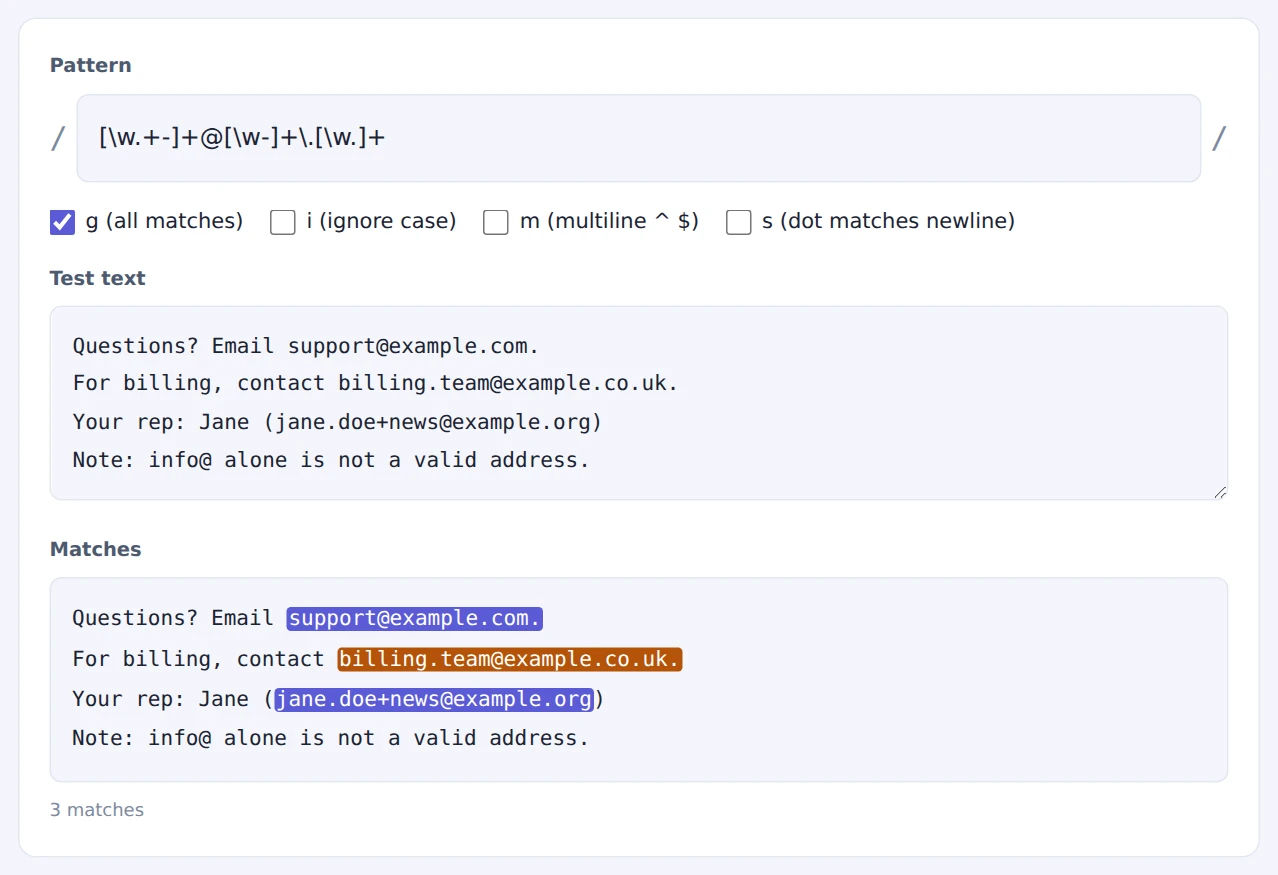
An incomplete ‘info@’ is correctly not matched
STEP 3. Set the flags
Tick g to find all matches, i to ignore case, and m to make ^ and $ match at each line.
STEP 4. Refine the pattern
If it matches too much or too little, adjust the pattern bit by bit and watch the results change.
Don’t try to write the perfect pattern in one go. Start short, then add conditions a piece at a time.
When it comes in handy
- Form validation: test patterns for email addresses or phone numbers
- Extracting data: find URLs, dates or IDs in logs and documents
- Find and replace: check a pattern matches only what you intend before replacing
- Spreadsheet functions: try patterns for REGEXMATCH or REGEXEXTRACT
FAQ
What are some useful patterns?
[\w.+-]+@[\w-]+\.[\w.]+: email addresses (simple)https?://[^\s]+: URLs\d{4}-\d{2}-\d{2}: ISO dates (2026-10-08)\(?\d{3}\)?[-.\s]?\d{3}[-.\s]?\d{4}: US phone numbers#[0-9a-fA-F]{6}\b: HEX color codes
It matches here but not in my code. Why?
The usual culprit is backslashes. In many languages, \d inside a string has to be written "\\d". Regex features (such as lookbehind) also vary between languages. This tool follows JavaScript’s rules.
Can it match accented or non-English characters?
Yes, but note that \w only matches basic Latin letters, digits and underscores. To match letters in any language, use \p{L} with the u flag in JavaScript, or list the characters you need in brackets.
Things to keep in mind
- JavaScript engine: results may differ slightly in other languages
- Perfect email validation is hard: treat regex validation as a quick check that catches obvious mistakes
- Overly complex patterns can hang: nested repetition can stall on long text
- Building SQL conditions? Turn a list of matches into a SQL IN clause with the SQL IN-Clause Builder
Summary
Regex gets much easier when you build it up step by step while watching the results. The Regex Tester shows matches the moment you type, and your data never leaves your device.
Next time you write a pattern, try it here first.